A reliable HR ticketing system is only as good as the documentation behind it. Good documentation drives adoption, simplifies maintenance, and maximizes your technology investment.
Four signals your HR ticketing docs aren’t working:
- HR fields the same questions about how to submit a ticket every week
- Managers don’t know how to approve requests routed to them
- Tickets get categorized inconsistently, making reporting unreliable
- New hires can’t figure out where to submit basic HR requests
If you’re tasked with creating documentation for an HR ticketing system, here’s a step-by-step guide to producing something users will actually rely on.
Define your system’s purpose and goals
Before you start writing, understand what the HR ticketing system is designed to achieve. Is it for handling employee grievances, processing payroll queries, or managing leave applications? Or a combination? The system’s purpose shapes the content and tone of your documentation.
Start with an introduction
Begin documentation with an introductory section that:
- Explains the purpose and scope of the HR ticketing system
- Provides a brief overview of the main components and features
- Lists the intended audience (HR professionals, general employees, or both)
Outline the user interface
Walk through the system’s user interface in detail:
- Use screenshots to illustrate different sections and features
- Highlight the primary navigation menus, buttons, and fields
- Annotate with arrows or callouts to point out crucial elements
Example: the dashboard displays your open tickets in the left panel, with priority levels color-coded (red for urgent, yellow for medium, green for low).
Create step-by-step guides for common processes
Break down typical tasks:
- How to create a new ticket
- How to categorize and prioritize tickets
- Steps for escalating a ticket
- The process for closing and archiving completed tickets
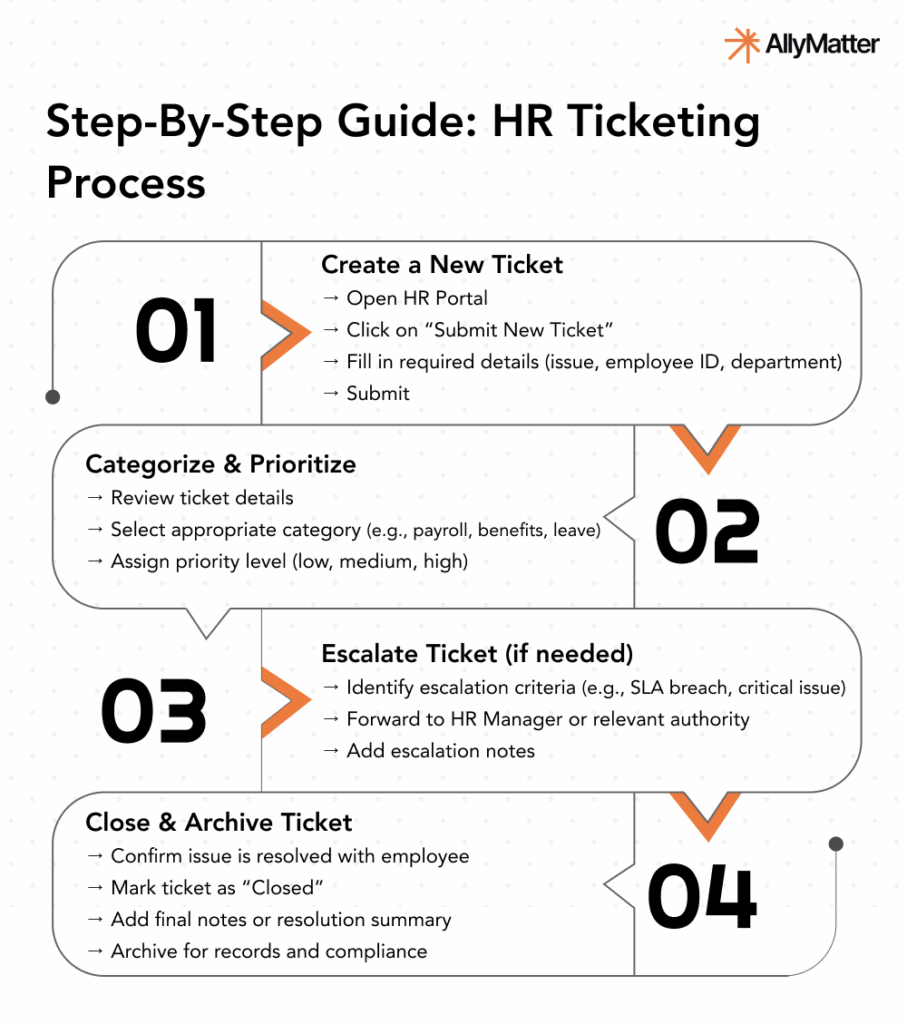
Use clear, concise language. Include screenshots for each step.
Connect your systems: Integration considerations
Modern HR departments rely on multiple systems working together. Your documentation should address:
- How the ticketing system integrates with other HR platforms (HRIS, payroll, LMS)
- Data flow between systems (what transfers automatically vs. manually)
- Authentication methods (Single Sign-On options)
- Troubleshooting integration issues
Example: when an employee updates their address in the HRIS, this information automatically syncs with the ticketing system within 24 hours.
Empower users with troubleshooting
Even the most well-designed systems face issues. Dedicate a section to common problems:
- List frequent error messages and their meanings
- Describe common user mistakes and how to avoid or correct them
- Provide steps for system resets or basic debugging
Ensure compliance throughout documentation
Given the regulatory requirements surrounding HR functions, include:
- How the system helps maintain compliance with relevant laws (GDPR, HIPAA, etc.)
- Documentation retention requirements and capabilities
- Audit trail functionality
- Required approval workflows for sensitive processes
Highlight security and data privacy measures
Document the system’s security measures:
- How personal and sensitive data is protected
- Data backup and recovery processes
- Guidelines for strong passwords and user confidentiality
Enable decisions with metrics and reporting
Help HR teams act on data-driven insights:
- Document available reports and dashboards
- Explain how to create custom reports
- Provide examples of how metrics can inform decision-making
Example: by tracking “time to resolution” for benefits questions, you can identify which benefits policies may need clearer employee communication.
Address accessibility
The HR ticketing system should be accessible to all users, including those with disabilities:
- Tips on using the system with screen readers or assistive technologies
- Built-in accessibility features
- Alternatives for users who might face challenges accessing the system
Tailor documentation for different user roles
Different stakeholders need different information:
- HR administrators need complete system knowledge
- Managers need to know how to approve requests and view team metrics
- Employees need focused guides on submitting and tracking tickets
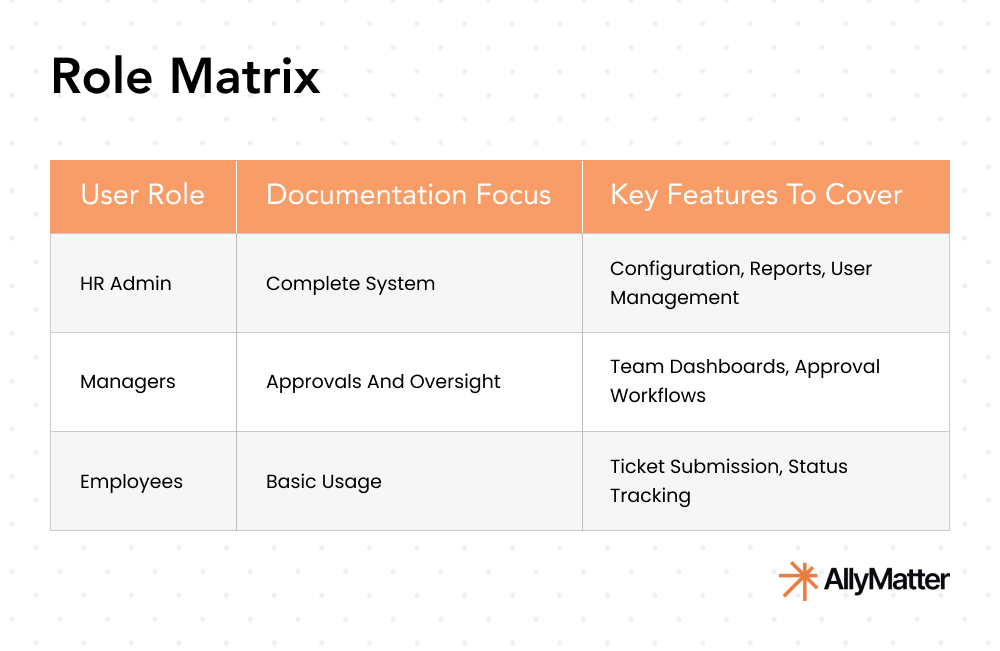
Create role-specific quick-start guides that contain only what each user type needs to know.
Optimize for mobile
With remote and hybrid work standard, document mobile functionality:
- Differences between desktop and mobile interfaces
- Mobile-specific features and limitations
- Tips for efficient mobile use
FAQs and best practices
A well-crafted FAQ section addresses common user queries fast. Gather feedback from initial users or beta testers to build it.
Best practices for users:
- Proper ticket categorization techniques
- Guidelines for clear communication within tickets
- Tips for tracking and following up on pending tickets
Build a clear glossary of terms
Include a glossary that defines any technical or industry-specific terms used throughout your documentation.
Provide contact information
Despite the best documentation, users will sometimes need direct assistance:
- Contact details for technical support (email, phone, hours)
- Response time expectations
- Links to online resources or forums
Update the documentation regularly
As the HR ticketing system evolves, so should your documentation. Regularly review and update. Document version history clearly. See Building a Future-Proof Internal Knowledge Base for the longer view.
Seek feedback and test the documentation
Before finalizing, ask a diverse group of users to test the documentation. Their feedback identifies missing information or areas of confusion.
Three scenarios
An honest read on where this documentation work pays off most:
If you’re under 30 employees with an HR team of one or two, lightweight documentation in your existing tool will hold. The full structured documentation approach pays off as the team grows.
If you’re 30 to 200 employees and HR is fielding repeat questions about how to use the ticketing system, this is the moment. Building docs in a structured knowledge base with tagging, version control, and access permissions makes the documentation itself easier to maintain. AllyMatter is what we built for this transition.
If you’re 200+ employees, multi-location, or in a regulated industry, your HR ticketing documentation needs versioning, role-based access, and audit trails. AllyMatter or another purpose-built KB makes sense here. We’d start with AllyMatter.
How AllyMatter supports HR ticketing documentation
Creating and maintaining HR ticketing system documentation gets significantly easier on a centralized knowledge management platform.
- Tag-based organization helps you structure documentation with smart categories. Users find exactly what they need without navigating folder trees.
- Version control keeps documentation current without losing historical information. When the HR system updates, you can track changes, compare versions, and maintain an audit trail of all documentation modifications.
- Role-based access lets you give each user type the right level of detail. HR administrators see comprehensive setup guides; employees access streamlined how-to content.
- Approval workflows make sure documentation updates route through the right reviewers before going live.
Building documentation that drives HR success
Creating comprehensive documentation for an HR ticketing system requires technical knowledge, empathy for the end user, and an eye for detail. The primary goal is simplifying the user’s experience, making it as straightforward as possible. A well-crafted guide cuts the back-and-forth and gives support teams room to focus on harder problems.
HR teams that document their ticketing processes spend less time firefighting.
Start your 30-day free trial. No credit card to start, and a 30-day money-back guarantee if you convert and change your mind. Or try the live demo to see how AllyMatter handles structured documentation.
Not ready for a trial? Migration from Confluence, Notion, SharePoint, or Drive is on us when you decide. We’ll move your existing docs over and have you running in about a week.
FAQs about HR ticketing system documentation
How often should HR ticketing system documentation be updated?
Review your documentation quarterly and update immediately after any system changes. Set calendar reminders to check for outdated screenshots, process changes, or new features that need documentation.
What’s the difference between user guides and process documentation?
User guides focus on how to navigate and use the system interface. Process documentation explains the workflow, decision points, and business rules behind each action. Both are essential.
How do you ensure documentation stays relevant as your system evolves?
Assign documentation ownership to specific team members, create update workflows triggered by system changes, and gather regular feedback from users about gaps or outdated information.
What documentation format works best for different user roles?
Administrators need comprehensive technical guides. Managers need approval workflow summaries. Employees benefit from visual quick-start guides. Tailor format and depth to each audience.
How can you measure the effectiveness of your HR system documentation?
Track support ticket volume for documented processes, time to resolution for common issues, and user feedback scores. A decrease in basic how-to questions indicates effective documentation.
Related reading
- How Knowledge Bases Can Help Deflect Tickets
- Kill the Repeat Questions That Drain HR
- HR Knowledge Base: Complete Guide for Scale-Ups
- Internal Knowledge Base Best Practices
- Building a Future-Proof Internal Knowledge Base

Vikas is a B2B marketing professional with over 14 years of experience in content strategy, messaging, and demand generation. He specializes in turning complex business challenges into clear, actionable stories to connect meaningfully with audiences.